网络搜索
AI 应用现在内置了网络搜索功能,可提供给应用调用搜索引擎和获取网页内容的能力。
支持 API 和 MCP 两种使用方式。
搜索结果数据来源为多种搜索引擎混合数据,会根据可用性自动启用。
文档
MCP
服务器协议:Streamable HTTP
服务器地址:
可以在支持 MCP 的 AI 应用中直接调用。
点击跳转到 MCP 样例
API 详细文档
可以通过 查看。
点击跳转到 API 调用样例
MCP 样例
注意将下面 url 中的 xxx 替换为你的微服名称
Claude Code 配置
编辑 Claude Code 的配置文件 ~/.claude.json
添加如下 MCP 服务器配置:
json
{
  ...
  "mcpServers": {
    "aisearch": {
      "type": "http",
      "url": "https://aisearch-ai.xxx.heiyu.space/mcp/"
    }
  },
  ...
}Codex 配置
编辑 Codex 的配置文件 ~/.codex/config.toml
添加如下 MCP 服务器配置:
toml
[mcp_servers]

[mcp_servers.aisearch]
type = "http"
url = "https://aisearch-ai.xxx.heiyu.space/mcp/"AI 对话客户端配置
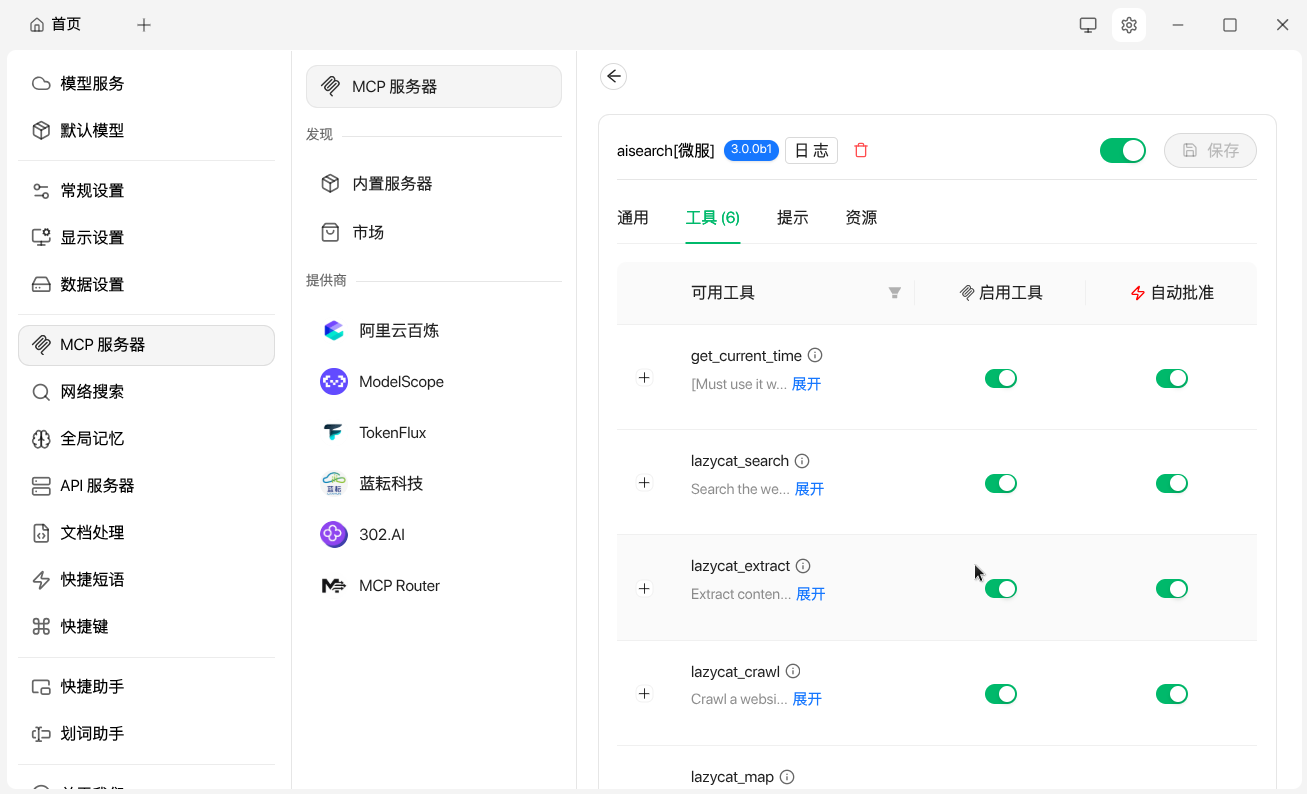
以 Cherry Studio 配置为例,在 设置 -> MCP 服务器中添加如下配置:
- 名称:aisearch
- 类型:可流式传输的 HTTP (streamableHttp)
- URL:https://aisearch-ai.xxx.heiyu.space/mcp/
点击右上角的保存并打开启用开关,在工具页面可以看到各种 MCP 工具说明启用成功。
在对话界面底部手动启用 MCP 工具 aisearch,就可以在对话中使用微服提供的网络搜索功能了。
API 调用样例
注意将下面 url 中的 xxx 替换为你的微服名称
搜索
bash
curl -X 'POST' \
  'https://aisearch-ai.xxx.heiyu.space/search?query=LazyCat%20Cloud%20Website&include_raw_content=false&max_results=10&include_answer=false&include_usage=false' \
  -H 'accept: application/json' \
-d ''返回:
json
{
"query": "LazyCat Cloud Website",
"answer": null,
"images": [],
"results": [
{
"title": "懒猫微服",
"url": "https://lazycat.cloud/download/",
"content": "2 天之前 · 懒猫微服是一款专为开发者和技术爱好者打造的私有云解决方案。它结合了强大的AI计算能力和领先的LZCOS操作系统,提供超安全内网穿透、NAT穿透、零信任硬件设计,以及一站式应用商 …",
"score": 1,
"raw_content": null,
"favicon": null
},
{
"title": "AI 服务器, 开源开发者专属福利! - GitHub Pages",
"url": "https://manateelazycat.github.io/2024/08/17/lazycat-microserver/",
"content": "2024年8月17日 · 🚀 重磅发布: #懒猫微服 - 你的专属 AI 私有云服务器! 👨💻 源自国内顶尖操作系统团队 🛠️ 三年匠心打磨, 底层架构精心设计 🎉 流浪地球机甲风, 今天终于量产啦! 🔥 产品亮点, 降低开发者创作 …",
"score": 0.8,
"raw_content": null,
"favicon": null
},
{
"title": "懒猫微服开发简明教程 | 虫子樱桃",
"url": "https://czyt.tech/post/simple-guide-for-developing-for-lazycat-nas/",
"content": "2025年2月7日 · 最近入手了懒猫微服,简单记录下开发相关的内容。 环境配置 先决条件 你必须有一台懒猫微服,购买地址 安装基本环境lzc-cli,请参考官方说明地址 如果你要发布程序,必须要申请成为懒 …",
"score": 0.7,
"raw_content": null,
"favicon": null
}
],
"response_time": "1.19",
"usage": null,
"request_id": null
}获取网页内容
bash
curl -X 'POST' \
  'https://aisearch-ai.xxx.heiyu.space/extract?urls=https%3A%2F%2Flazycat.cloud%2F&include_images=false&extract_depth=basic&chunks_per_source=3&include_favicon=false&format=markdown&timeout=60&include_usage=false' \
  -H 'accept: application/json' \
-d ''返回:
json
{
  "results": [
    {
      "url": "https://lazycat.cloud/",
      "raw_content": "[首页](https://lazycat.cloud/)[懒猫微服](https://lazycat.cloud/lcmd)[懒猫AI算力舱](https://lazycat.cloud/ai-pod)[应用商店](https://lazycat.cloud/appstore)[攻略](https://lazycat.cloud/playground)[下载](https://lazycat.cloud/download)[AI 助手](https://lazycat.cloud/chat)[开发者](https://lazycat.cloud/developer)[关于](https://lazycat.cloud/about)\n(太长在文档中省略)",
      "images": [],
      "favicon": null
    }
  ],
  "failed_results": [],
  "response_time": 1.6488618850708008,
  "usage": null,
  "request_id": null
}